Synopsis
Sorting three observations produces three lines. Adding uniq -c produces only two. Follow the data through both commands, then hold the write end of a pipe open for two seconds to see when the last count becomes available. Use an ordinary account, a Bourne-style shell, and the three-line observations.txt from Streams, redirection, and filters.
Reproduce the report
Change to the practice directory.
cd "$HOME/unix-practice"If the directory is missing, complete the practice directory exercise first. Inspect the input.
cat observations.txtExpected contents of observations.txt
sparrow
robin
sparrow
If the file is missing or has different contents, return to the observations exercise. Run the original report.
LC_ALL=C sort observations.txt | uniq -cExample output
      1 robin
      2 sparrow
The leading spaces before each count can vary. The first field gives the number of occurrences. The second identifies the bird.
Follow the file and the pipe
The shell recognizes the unquoted vertical bar as a pipeline operator and parses a command on each side. On the left, LC_ALL=C selects the C locale for sort. The word observations.txt supplies the filename that sort opens. On the right, -c tells uniq to count each group of adjacent equal lines. Neither utility receives the vertical bar as an argument. Portable Operating System Interface (POSIX) shell language
A process is a running instance of a program. Each process uses small integers called file descriptors to refer to open files and other input or output connections. The conventional descriptors are 0 for standard input, 1 for standard output, and 2 for standard error.
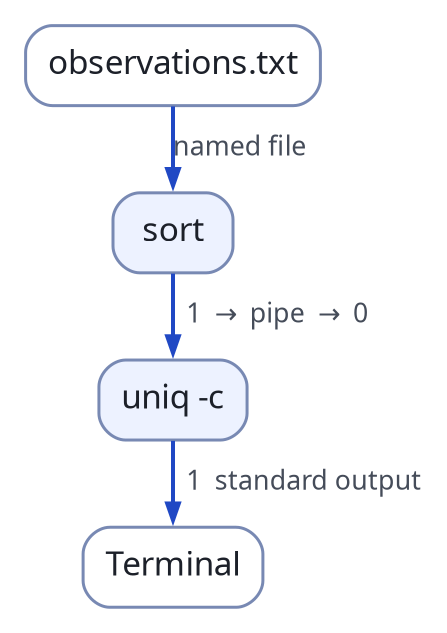
The pipe connects the output of sort to the input of uniq. Both programs can still write diagnostics to the terminal.
To connect these commands, the shell arranges a pipe with a read end and a write end. The kernel holds bytes written at one end until a process reads them at the other. The commands can run concurrently. As sort writes the ordered names, uniq reads them from its standard input. A pipe carries bytes. The newline characters in those bytes let uniq recognize lines. OpenBSD pipe(2)
Run the first stage alone.
LC_ALL=C sort observations.txtExpected output
robin
sparrow
sparrow
Run the last stage directly against the unsorted file.
uniq -c observations.txtAll three counts are one. The first and third lines contain the same word, but the intervening line ends the first group. Sorting brings the sparrows together. OpenBSD uniq(1)
Redirect the report
Inspect the practice directory before saving the result. The next report command creates report.txt or replaces its contents. Preserve any existing copy that must be kept.
pwd
ls
After confirming the directory and destination, run the report with output redirection.
LC_ALL=C sort observations.txt | uniq -c > report.txtThe shell connects descriptor 1 of uniq to the file. The sorted lines still travel through the pipe, and descriptor 2 still leads to the terminal. A successful run normally returns to the prompt without printing the counts. Read the destination to verify the result.
cat report.txtLook for one robin and two sparrows. If sort cannot open its input, its diagnostic can appear on the terminal even though the shell has created an empty report. With the default pipeline status rules, the status comes from the last command. An empty input stream can be a successful run for uniq. The shell script exercise checks for missing input explicitly.
Hold the write end open
Count the newline characters in the observations file.
cat observations.txt | wc -lThe count is 3. Predict which part of the result changes if the writing side stays open after sending the same three lines.
(cat observations.txt; sleep 2) | wc -lThe count is still 3, but it arrives after a pause. Parentheses group the commands on the writing side. cat writes the file, then sleep keeps that side open for two seconds without adding data. During the pause, the pipe can be empty while a writer still holds it open. A blocking read then waits. Once every write end has closed and the reader has consumed the buffered data, a read returns zero bytes. This is end-of-file. At that point wc can print its final count. The same rule lets uniq finish the final group in the report. POSIX read()
This explains one small but essential job the shell performs when it sets up a pipeline. It closes the spare pipe descriptors after arranging the connections. If the shell accidentally retained a copy of the write end, uniq could wait for more input even after sort had exited.
Return to Processes, jobs, and signals to locate and control a process from the shell.